How do I chat with a RMS Support Center Technician?
Introduction
Our online Support Desk provides a quick and simple way to get answers for those quick and simple problems by using chat technology. Starting a chat session is quick, just enter your name, email, and question and you are ready. One of the technicians will soon be notified that someone is waiting on chat and they answer back. It is that simple. Read on to get detail instructions for each step of the process.
Step 1 - Are there technicians monitoring the chat lines?
The RMS Support Center is open Monday through Friday from 6:30 am to 3:00 pm Pacific Standard Time. You can see our status just by looking at the chat indicator shown along the left side of any of our web pages. The chat indicator can be any of the following:
| Indicator | Status |
|---|---|
|
|
RMS Support Center personnel are available for chat. |

|
RMS Support Center personnel are not available for chat and will likely not be available for some time. |

|
RMS Support Center personnel are temporarily not available for chat and likely will return soon. |

Step 2 - Start a Chat Session
To start a click on the Live Support indicator when the status is "ONLINE". Once you have clicked on the indicator the following window will appear:
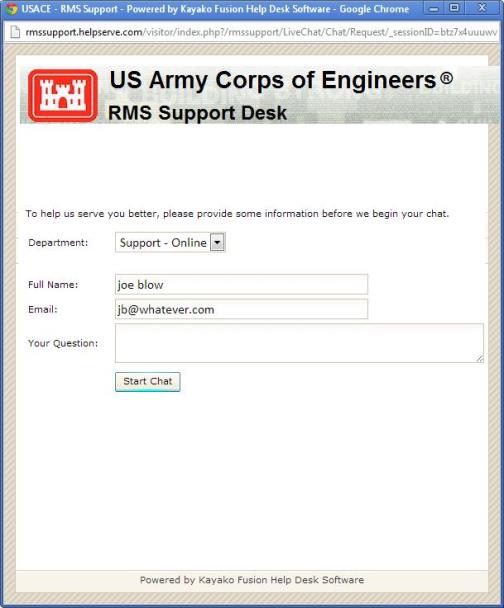
Select the Department to "Support - Online" and then enter your name, email, and question. If you have previously logged into our RMS Support Desk website your name and email will already have been entered for you. After that information has been entered click on [Start Chat] to have the request sent to a technician at the RMS Support Center.
The window will then change to show your position in the queue or if there is no one in the queue then first available technician will pick up your chat and reply to your question.