How do the Material, Approval, and Submit dates on the Submittal Register get populated?
The dates for Material, Approval, and Submit needed by fields for a submittal are calculated fields and cannot be modified as they are calculated by determining the actual or schedule start date for the activity linked to the submittal and then adjusting that date by the applicable modifier. If the activity linked to the submittal does not have a start date or is not linked to an activity these date fields will be empty.
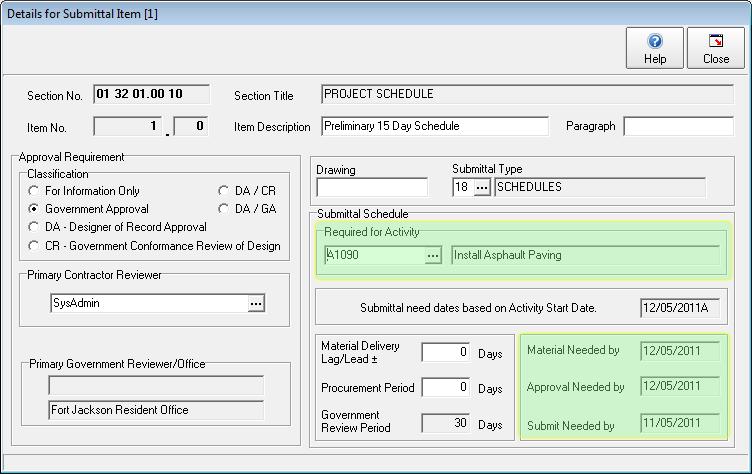
In the screen shot below you will see a submittal item with a description of "Preliminary 15 Day Schedule". It is linked to the activity A1090 titled "Install Asphalt Paving". In turn activity A1090 has a actual start date of 12/5/11 as denoted by the letter "A" appended to the date. Since an activity with a start date has been linked to this submittal the Material, Approval, and Submit needed by dates can be calculated by applying one of the three appropriate modifiers: Material Delivery Lag/Lead, Procurement Period, or Government Preview Period to the date as shown in the screen shot.
To link a submittal to an activity click on the [...] button to open the activity lookup window. If the selected activity has either a schedule or actual start date the needed by date fields will automatically populate with the correct dates.
Note, make sure to link the submittal item to the very first Pay Activity the submittal item would be required for.