Where do I find the contract ID?
Introduction
Every contract awarded by the USACE is assigned a contract number. The contract number is long and comprised of letters, numbers, dashes, and perhaps a space as well. An example would be W912HN-01-C-0022 0034. However to track contract related information in the database RMS and QCS use what is called a contract ID. The contract ID is a letter followed by seven digits. An example would be B2001234. It is important before contacting the RMS Support Center that you have your contract ID available as it will be needed to answer many support issues. Here we will show you how to find your contract ID.
Where Contract IDs are Found
In QCS you may find a contract's ID in any one of two ways. When first opening QCS after logging in you will see a spreadsheet/grid where each row represents one of the contracts that have been added. The second column in the spreadsheet/grid will display the ID for that contract. In the screen shot below the contract "Const. Building 710A - Phase 3" has the ID of K2000174.

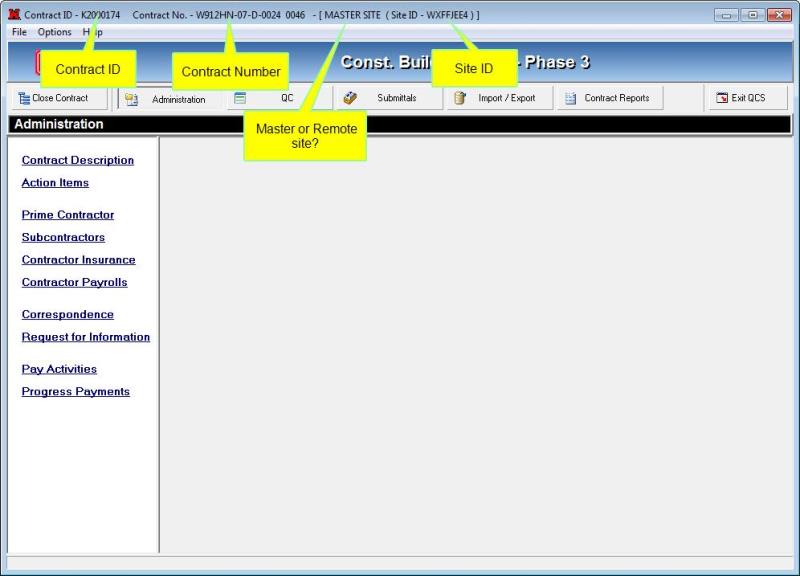
The second location in QCS where the contract ID is displayed is in the title bar after you have opened a contract for editing. In fact you will find other interesting information such as:
- Contract Number as opposed to Contract ID.
- Whether the site is a master or remote site.
- The site's ID.
See the following screen shot to see how this information is arranged.