Why is part of my Contractor Payrolls module "Read Only"?
Introduction
The Contractor Payroll screen shows data from three modules as identified in the following list:
- The grid control where the user can enter a P, S, or N to indicate if the payroll for that week was submitted with problems, without problems, or if no payroll was submitted. The grid belongs to the Contractor Payroll Module.
- The two edit box controls for the contractor's first and last day on site. These two edit boxes belongs to the QC Daily Report Module.
- The edit box control to enter the contractor's SF1413. This box belongs to the Contractor Insurance Module.
If you do not have ownership of all three of these modules then certain data entry controls will be disabled. The purpose of this article to explain which data entry control is associated with each related module and to show how ownership of the data entry controls may be changed between RMS and QCS and also between QCS sites.
Screen Shot
A screen shot of the Contractor Payroll module in QCS is shown below:

In addition the screen shot shows what module each data entry field is associated with.
The spreadsheet is the main data entry field. It is where you will enter a N (non work week), P (problem payroll), or S (payroll submitted) for each week the particular subcontractor is on site. In RMS the combox "Payroll Entered By" determines if RMS or QCS has ownership of this module. In QCS the site that has ownership of the "Contractor Payroll" module can enter information into this grid. For all other sites it will be read only.
Below the grid you will see two date data entry controls to hold the highlighted contractor's first and last day on site. In RMS if QCS has been activated for the contract then these controls are owned by QCS. In QCS you may edit these dates if your site has ownership of the "Daily Reports" module, otherwise they are read only.
Also below the spreadsheet you will see the data entry control for the SF 1413 insurance date. RMS has ownership of this control if Insurance Entered By is set to Government otherwise this data entry fields is owned by QCS. In QCS you may edit this date if your site has ownership of the "Contractor Insurance" module, otherwise it is read only.
Changing Ownership in RMS
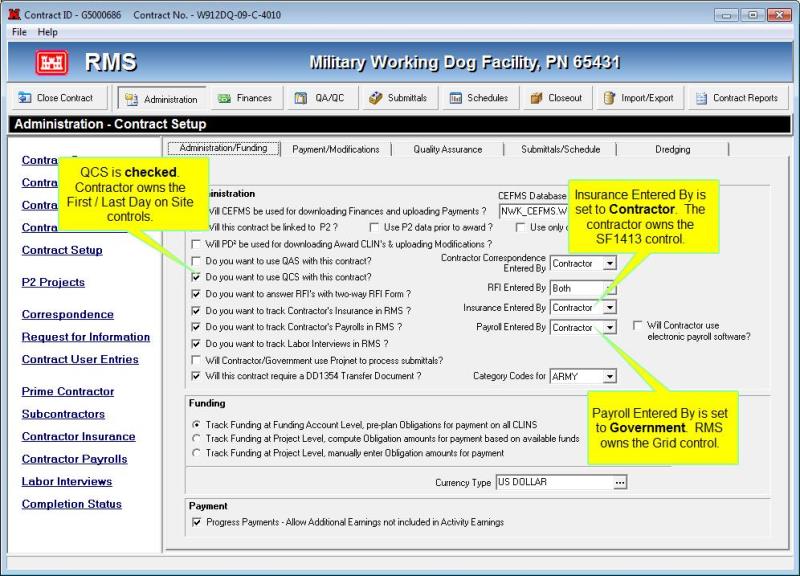
In RMS you can switch the ownership on each group of controls between RMS or QCS. To change ownership of any of these data entry controls you must first activate QCS for the contract. You may do that by opening the "Contract Setup" module and checking the box next to "Do you want to use QCS with this contract?" as shown below. By doing that the first and last day on site data entry controls will belong to QCS. To switch ownership of the SF 1413 and the grid the RMS user will have to switch "Insurance Entered By" and "Payroll Entered By" to contractor.
As an example lets look at the screen shot below:
Changing Ownership in QCS
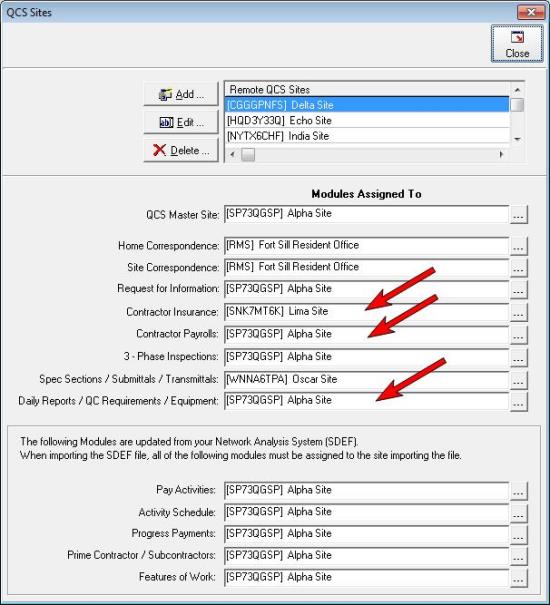
A QCS user may change ownership of all three modules in the QCS Site Management window. To open the QCS Site Management window you will have to open the "Import / Export | QCS" module. If your QCS is a master site you will see a checkbox in the right side labeled Will QCS be used at a remote QCS site?. If the checkbox is empty click it to put a checkmark in it. Then you will see the button [QCS Sites] appear. After clicking on that button you will see the QCS Sites window. Here you may control which site has ownership of the various data entry controls in the Contractor Payrolls module by changing the site assignment for each of the modules identified below.