How do I setup the Activity Code Structure in Primavera?
Introduction
Contracts can be configured by the USACE to receive Network Analysis System (NAS) information from Primavera or have the information manually entered into QCS. Primavera is a scheduling software that is able to export information in a format called SDEF (Standard Data Exchange Format) that can be read by QCS. If the Network Analysis System (NAS) information is to come from Primavera then the contractor will have to setup the contract in Primavera so that Primavera can create a SDEF (Standard Data Exchange File) with all of the correct NAS information in it. This will require that the contractor properly configure the Activity Code Structure (ACS) in Primavera and take into account a number of other considerations.
Note that the RMS Center will only be able to answer Primavera questions that relate to the structure of the SDEF file. If you provide us with an SDEF file we will be able to tell if it is correctly structured. We will not be able to provide support in how to create the SDEF file within Primavera or how certain values come to be inside of the SDEF file. To get the answer to those questions as well as answers to the internal workings of Primavera the contractor will need to contact Oracle Global Support at 800-223-1711. All of the information provided in this Knowledgebase article was provided by Oracle and reprinted here for your convenience. None of this information was specified, created, or mandated by the RMS Support Center.
The Activity Code Structure (ACS)
The US Army Corps of Engineers (USACE) requires the consistent use of a predefined Primavera ACS in all projects so that a SDEF file can be properly created. The ACS specifies the sequence, name, and length of Primavera code values in the project. The SDEF format must exactly adhere to this structure.
The ACS for Primavera 3 is as follows:
| Code | Length | Description |
|---|---|---|
| WRKP | 3 | Workers Per Day |
| RESP | 4 | Responsibility Code (Contractor ID) |
| AREA | 4 | Area |
| MODF | 6 | Mode or Claim Number |
| BIDI | 6 | Bid Item (CLIN) |
| PHAS | 2 | Phase |
| CATW | 1 | Category of Work |
| FOW1 | 10 | Feature of Work (Segment 1) |
| FOW2 | 10 | Feature of Work (Segment 2) |
| FOW3 | 10 | Feature of Work (Segment 3) |
The SDEF value code Feature of Work (FOW) is 30 characters long. Because the maximum length of a Perimavera 3 value code field is 10 characters, the FOW value code is divided into 3 segments as shown above.
The ACS for versions of Primavera after Version 3 is as follows:
| Code | Length | Description |
|---|---|---|
| WRKP | 3 | Workers Per Day |
| RESP | 4 | Responsibility Code (Contractor ID) |
| AREA | 4 | Area |
| MODF | 6 | Mode or Claim Number |
| BIDI | 6 | Bid Item (CLIN) |
| PHAS | 2 | Phase |
| CATW | 1 | Category of Work |
| FOW | 20 | Feature of Work |
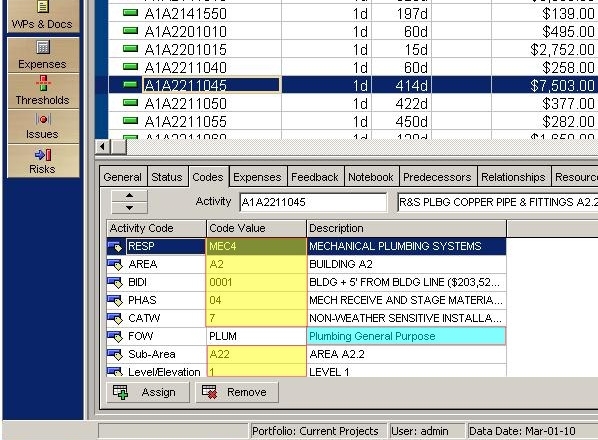
In versions of Primavera after version 3 the value code fields were expanded from 10 characters to 20. As a result the length of the FOW value code can be expanded to a length of 20. However due to an idiosyncrasy in Primavera a FOW with a length of more than 20 characters can still be entered. In the figure below you will find a screen shot from Primavera showing a list of activities with activity A1A2211045 highlighted in the upper panel. The lower panel contains attirbutes related to that activity contained in tabs. The ACS information is in the tab labeled "Codes". For this particular contract you will see activity codes for RESP, AREA, BIDI, PHAS, CATW, FOW, Sub-Area, and Level/Elevation. The activity codes Sub-Area and Level/Elevation are custom activity codes. These codes must come after all of the activity codes required for the ACS. In addition these codes are ignored by QCS. When Primavera creates a SDEF file the values entered into the "Code Value" column are included in the SDEF file as shown by the yellow highlighted cells. The one exception is FOW. Primavera will include in the SDEF file the value in the "Description" column rather than the value in the "Code Value" column. Using the example in the figure below the FOW for activity A1A2211045 is "Plumbing General Purpose" as shown in the blue highlighted cell. Since the description column can be more than 20 characters in length contractors will be able to include in the SDEF file FOW values that are more than 20 characters long in spite of the Primavera requirement that the length of activity code values is less than 20 characters.
Other Considerations
Primavera P6 projects can store far more data than the SDEF specification requires. For example, the SDEF file structure allows for only one application of a resource per activity, while P6 enables you to apply a resource to an activity repeatedly using resource lags and durations. P6 projects intended for use with the SDEF interface should comply with the SDEF specification. You should not utilize the additional capabilities that P6 offers because the SDEF file structure cannot store the additional data.
The following is a list of items that a contractor should consider when using Primavera for the purposes of creating an SDEF file.
- In Primavera 6 you will need to make sure you define each activity code as a project and not global activity code. When converted, the code value for the “Feature of Work” activity code displays in the Activity Codes Description column of the XER file, and a unique code value is generated by the converter. For all other activity codes, the code value displays in the Activity Codes Code Value column of the XER file.
- Activity descriptions: The SDEF file structure only allows activity descriptions up to 30 characters long. When converting XER files to SDEF, only the first 30 characters of the description are exported.
- Activity IDs: The SDEF standard does not support activity IDs longer than ten characters, while P6 projects may contain activity IDs longer than ten characters. Activity IDs are truncated to the first ten characters when converting a P6 project to SDEF. Due to this truncation, it is possible that duplicate activity IDs will be encountered during the conversion; if so, the conversion is aborted. To ensure that conversions to SDEF are not aborted, P6 projects should not contain activity IDs longer than ten characters. If activity IDs must be longer than ten characters in P6, the first ten characters must be unique.
- Activity limit: SDEF files cannot contain more than 10,000 activities. When converting XER files to SDEF, only the first 10,000 activities are exported.
- Activity totals: The SDEF file structure does not store individual resource budgets as P6 does. Instead, SDEF stores total budgeted cost and total budgeted units for each activity. The conversion utility totals costs and units for each activity’s resources in conformance with the SDEF standard.
- Calendars: Calendars in SDEF are only one character; therefore, calendar names from P6 are truncated to one character. You are limited to 36 calendars in SDEF (A through Z and 0 through 9).
- Cost per unit: The SDEF standard uses a calculated cost per unit for each activity defined as the activity’s budget cost divided by its budget quantity. Primavera’s SDEF conversion conforms to this standard.
- Data mapping: The following table describes how some P6 data is converted to SDEF:
| SDEF Field | P6 Field or Calculation |
|---|---|
| Total Qty | Budgeted Units for the activity assignment |
| Cost Per Unit | Budgeted Cost divided by the Budgeted Units for the activity assignment. |
| Qty to Date | Actual Units for the activity assignment. |
| Activity Cost | Budgeted Cost for the activity assignment. |
| Cost to Date |
Actual Regular Cost for the assignment plus the Stored Material Cost (STMA) for the activity Note: The Stored Material Cost is derived from the Activity UDF named 'STMA'. Refer to the “Required User-defined Field (STMA)” bullet item on the previous page for more information. |
- Durations: The SDEF standard does not support durations longer than 999 days. If your P6 project contains durations longer than 999 days, these durations will convert to zero in the SDEF file.
- Expenses: The SDEF standard does not support expenses, so expenses are not exported to SDEF.
- Milestones: The SDEF standard does not recognize milestones as activities. If your P6 project uses milestones, the converter stores these as zero-duration activities.
- Required User-defined Field (STMA): SDEF files store activity stored material cost data in a field named STMA. This field does not exist in P6. When converting an SDEF file to XER, if the STMA field does not exist as a UDF in the Project Management module project, it will be automatically created during the import process. If the STMA UDF was previously defined in a project (to be used for a different purpose), you should rename the pre-existing UDF before importing an SDEF file.
To store this data in a Project Management module project before you convert it to SDEF, you must create an Activity UDF named 'STMA'. This UDF must have a Data Type of Cost. If you do not create this UDF, the STMA field will be blank when you convert an XER file to an SDEF file.
- Required User-defined Fields (Contract Number and Contractor Name): SDEF files contain fields named Contract Number and Contractor Name. These fields do not exist in the Project Management module. When converting an SDEF file to XER, if the Contract Number and Contractor Name fields do not exist as user-defined fields (UDFs) in the Project Management module project, they will be automatically created during the import process. If the Contract Number and Contractor Name UDFs were previously defined in a project (to be used for a different purpose), you should rename the preexisting UDFs before importing an SDEF file.
To store this data in a Project Management module project before you convert it to SDEF, you must create Project UDFs named 'Contract Number' and 'Contractor Name'. These UDFs must have a Data Type of Text. If you do not create these UDFs, the Contract Number and Contractor Name fields will be blank when you convert an XER file to an SDEF file.
In SDEF files, values in the Contract Number field cannot be longer than six characters. When a Contract Number UDF value is more than six characters, this value is truncated to the first six characters when you convert to SDEF.
- Suspend and resume dates: The SDEF standard does not recognize suspend and resume dates, so suspend and resume dates are not exported to SDEF.